Which kind of HTML do you have?
This guide will explain how to convert HTML to WordPress from three different points of departure. The process will depend on where you are starting from.
- a static site made by hand. Files like
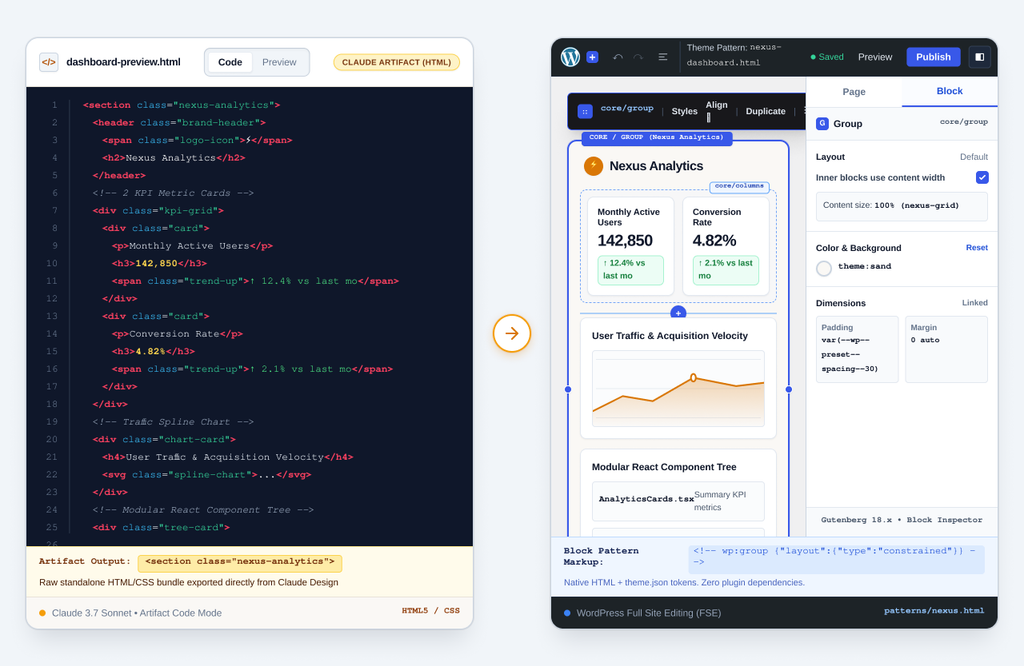
index.html,about.html, images, and a stylesheet. The most simple and common case. - An export from an AI design tool. Claude Design exports standalone HTML; Google Stitch exports HTML styled with Tailwind plus a DESIGN.md. One or a few long files, a lot of utility classes, forms that post nowhere.
- A “vibe-coded” app that only looks like HTML. A Lovable, Bolt or v0 export is a React project. The HTML is generated in the browser; there are no page files to convert. That one is a rebuild from the design, not a conversion, and its own page is here.
What a WordPress site is, compared with HTML pages
A website coded in HTML consists of individual webpages. A WordPress site is made up of content (what is said) and appearance (how it is said) separated from one another. In block themes, appearance is determined by a combination of design elements, templates and template parts, and a theme.json of colors, fonts and spacing, while content is determined by blocks. Converting a HTML site to a WordPress site is essentially separating the content and style of the site into these two components.
The four routes
| Upload the files as they are | Run them through a converter | Build a block theme yourself | Have it rebuilt | |
|---|---|---|---|---|
| What you get | The same static pages, served by a WordPress host | A theme that wraps your HTML, or an Elementor layout | A proper theme and editable pages | A pixel-for-pixel block theme, content, forms, analytics |
| Editable in WordPress | No | Partly: text inside wrapped HTML, or in the page builder | Yes, as blocks | Yes, as blocks |
| Forms | Whatever they were (usually nothing) | Markup only; still post nowhere | Wired to a form plugin | Wired: email, entries, Slack |
| Performance | As before | As before, plus the builder’s weight | As good as you make it | Guaranteed 93+ desktop with hosting |
| Effort | Minutes | Minutes, then days of fixing | Days to a week per site | 48 hours, none of them yours |
| Cost | Hosting | Tool fee, then your time | Your time or a developer’s | $499 |
The DIY route: HTML to a block theme in six steps
1. Install WordPress and a blank block theme
Any host, a fast one. Start from an empty block theme; WordPress’s own Create Block Theme plugin can generate one. Otherwise, you’ll have to fight against a large, general theme.
2. Move the design tokens into theme.json
Colors, font families, font sizes, spacing. From a hand-coded site these are in the stylesheet; from Stitch they are written out in DESIGN.md; from Claude Design they are in the exported CSS. Once they are in theme.json, every block and every editor control uses them, which is what makes the site consistent when someone who is not a designer edits it.
3. Turn the header and footer into template parts
Rebuild them from core blocks (site logo, navigation, group, paragraph). The navigation block will be linked to a menu that you’ll be able to edit in WordPress. This is the first part of the site that the client will be able to edit.
4. Turn each repeated section into a pattern
Hero, feature grid, testimonial, pricing table, call to action. Build each once from group, columns, heading, paragraph, image and buttons blocks, matching the original spacing, and save it as a pattern. Tailwind utility classes do not survive this step; the layout is rebuilt with block settings, which is more work than pasting and the reason the result is editable.
5. Make the pages
One WordPress page for each HTML page, using the same slug. Add patterns, paste text, upload images. Alt text is added to each image. Blog posts, if any, become posts.
6. Forms, analytics, redirects
Use a form plugin instead of using form markup. Add your tag manager once with default consents. If the HTML version of the site was already published to the same domain, redirect any URL that changed. Test the forms and run Google PageSpeed.
What converters actually produce
HTML-to-WordPress converters upload your files and return either a page builder layout (usually Elementor JSON) or a theme that styles the markup. Either option shows you how your site looks on the first day. Neither option does steps two to four above. The sections are not editable as blocks, the forms are decoration, and the page-builder route adds the builder’s weight. They are worth it if you want a static copy inside WordPress quickly and plan to do the real work afterwards. They are not a substitute for it.
Or have it done
MightyMigrate rebuilds your HTML site, whoever or whatever wrote it, as a pixel-for-pixel WordPress block theme with the content in editable pages, forms that email and post to Slack, analytics and consent, and redirects. $499 for up to 15 pages, live in 48 hours, with a staging link before anything switches. Scan the live site (or the exported one on any temporary URL) for the fixed price.
Questions people ask
Can I just upload HTML files to WordPress?
You can put both on the same hosting account. WordPress will not know they exist: no editing, no menus, no forms, and WordPress won’t generate a sitemap for them, either. It’s just hosting.
Can I paste HTML into a WordPress page?
Yes, into a Custom HTML block, and it renders if the CSS is available. It’s an alright way to import an odd section. It’s a bad way to structure a site because everything inside the block can’t be modified with blocks and styling is going to come from other places.
HTML to Elementor, or to blocks?
Blocks are one of the core features of WordPress, and you won’t incur any extra costs or weight by using them. A page builder adds its own layer, its own weight and often its own subscription. If you care about the loading times of your pages, you should probably avoid page builders.
Will the converted site look the same?
A wrapper converter produces the same HTML, so yes. A proper rebuild, yes if whoever does it measures. MightyMigrate’s policy is that if the result does not match, we refund the rebuild cost.
Reviewed 28 September 2026. The block-theme steps are how MightyMigrate builds its own rebuilds; export formats for Claude Design and Google Stitch are checked on their own pages.