Export a screen
On the canvas, open a screen and use its code view. From there, you can copy the code or download it to your computer. Each screen is exported as an HTML file. The HTML file contains Tailwind CSS utility classes and is linked to the Tailwind CSS CDN. This means the file can be viewed and presented as is.
Export the whole project
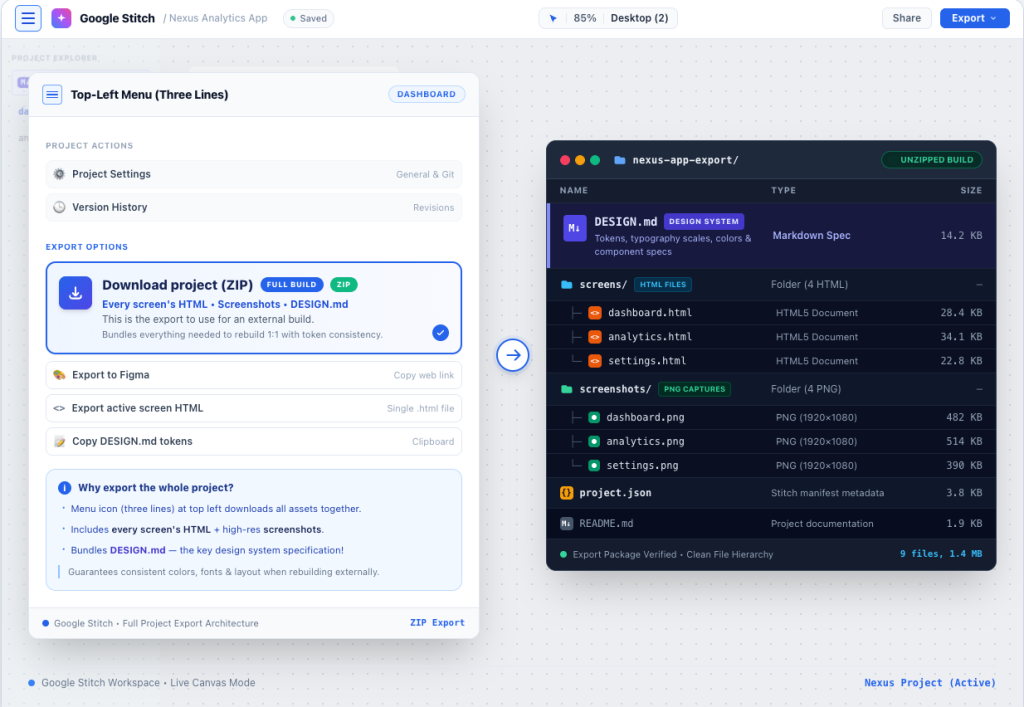
From the dashboard, the menu icon (three lines) at the top left downloads the whole project: every screen’s HTML, a screenshot of each, and DESIGN.md. This is the export to use for a build, because DESIGN.md is what makes the screens consistent when they are rebuilt somewhere else.
Copy to Figma
With a screen selected, Copy to Figma puts it on the clipboard as layers you can paste into a Figma file, grouped and named rather than flattened. Two things to know: it is only offered in Standard mode (Google’s community team confirmed this when people asked why the button was missing in Experimental mode), and it is a one-way trip; edits in Figma do not come back to Stitch.
DESIGN.md
A markdown file describing the project’s design system, showing patterns and rules of various elements and components as well as values for spacing, typography and colors used in the system, describing the design system in a way that is comprehensible to coding agents. You can also import a DESIGN.md into a new Stitch project to start from the same system. For anyone rebuilding the design as a real site, it is the most useful file in the download.
The MCP server: export without exporting
Stitch’s MCP server allows coding agents like Claude Code, Cursor, or the Gemini CLI to read the project directly, screens and design system included, so the agent builds from the live design rather than a downloaded copy. This is covered in more detail, along with the limitations, in Google Stitch and Claude Code.
What breaks the moment you host the export
- The screens are not a site. Each HTML file is its own page with its own copy of the header and footer; links between them, a shared menu and consistent changes across pages are yours to build.
- An uncompiled version of Tailwind CSS from a CDN is convenient for prototyping, but not ideal for production. The whole framework gets downloaded to each user of your website and Google PageSpeed emphasizes this. CSS should be compiled to only the classes actually used in your website.
- Forms. A sketch of a form, not a working one. Each requires a separate service.
- Images. For now, these are placeholders. The final images must be uploaded and resized.
- Editing text means a code change or a regeneration. There is no editor available in the folder.
What to do with it
A demo or one-page teaser: put the HTML on a static host, connect a domain, add a form service if there is a form. A product: the Claude Code route, with a developer finishing. A business website: rebuild it as a WordPress site with DESIGN.md as the token source, so the team can edit it and the forms work: the general steps are in HTML to WordPress.
Or have it done
MightyMigrate rebuilds your Stitch screens, pixel for pixel, as a fast WordPress site your team can edit: hosting, forms that send, analytics, your domain. $499 for a site, live in 48 hours, staging link first. Put the exported HTML on any temporary URL and scan it.
Questions people ask
Can you export Google Stitch to code?
Yes: HTML with Tailwind, per screen or for the whole project at once. There are reviews of Stitch 2.0 that show other frameworks are exported along with it. Check what your version offers, and treat HTML plus DESIGN.md as the dependable pair.
Why can’t I export to Figma?
You are in Experimental mode. Go to Standard mode and you will see Copy to Figma.
Can I export Stitch to WordPress?
No, a WordPress theme is built from the export by a developer, by Claude Code, or by a service like this one. Converters built by a third party wrap the HTML and make it look good, but the result is not editable as blocks.
Does the export include images?
The screenshots of each screen, yes. Images inside the design are typically generated placeholders referenced from the HTML; export them separately if you need them, and expect to replace them with real photography.
Checked on 28 September 2026 against Google’s Stitch community answers on exporting (whole-project download; Figma export in Standard mode only) and published coverage of DESIGN.md and Stitch 2.0.