Where the export lives
Claude Design is available at claude.ai/design and inside any Claude chat on a Pro, Max, Team, and Enterprise plan. To export and send designs, look for the option in the artifact menu while a design is active. There are three kinds:
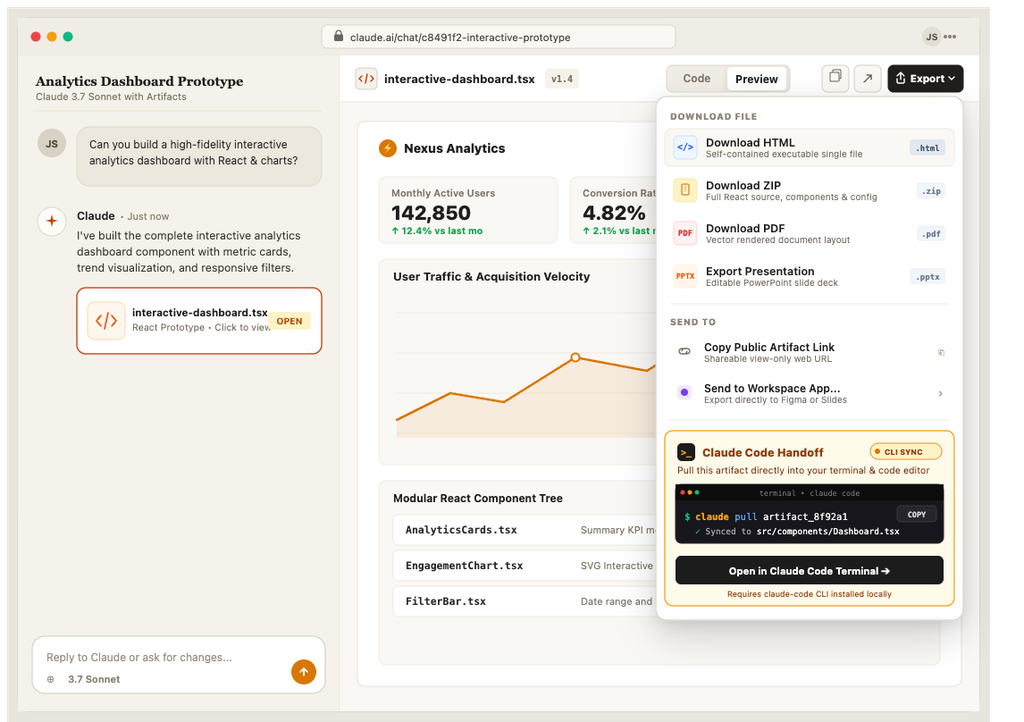
1. Download: standalone HTML, zip, PDF, PPTX
One file contains the markup, style, and script elements of a Web page in Standalone HTML. The page can be opened in a browser and will be shown fully functional. If the page is to be provided to the person developing the Web site, this is the format in which it should be given, as it defines the page exactly the way it should be.
Zip is a package of the html and accompanying assets. It’s the traditional way of distributing a web project. You can work on the project in your editor of choice.
The files are PPTX and PDF and are pictures of the design for decks and reviews. They are not a site and cannot become one without the HTML.
2. Send to: hosting and other tools
Claude Design can send designs to Vercel and Netlify (to publish sites instantly). Designs can be exported to project builders like Lovable, v0, Replit and Base44. Designs can be published to site builders like Wix and HubSpot. Designs can be exported to integrations like Canva, Gamma, Miro and Adobe to continue design work. The list above is a brief example of what integrations and tools Claude Design can send to; Anthropic’s help article has the current list.
Sending to a static host gets you a public URL fast. It also gets you exactly what the download gets you, served: a page with no form backend, no editor and no CMS.
3. Hand off to Claude Code
When a design is ready to build, Claude packages a handoff bundle (the design, its code and its intent) that you can pass to Claude Code with a single instruction, either to a local coding agent or to Claude Code on the web. This is the route for building a product from the design, and it is the route MightyMigrate’s own rebuilds take from a Claude Design: the bundle becomes a WordPress block theme. It assumes someone is going to run Claude Code, review what it builds, and host the result.
Exporting to Figma
This is a common request. As described in Claude Design’s documentation, exports are code and documents. Design systems go the other way (i.e. allow import of design systems from documents and files). So, if your process lives in Figma, the practical route is to send to Canva, or to paste screens into Figma by hand. The HTML document should be considered the source of truth in such cases.
What breaks the moment you host the export
- Forms are skeletal. By themselves, they do very little. To function as intended, forms require a service (a form endpoint, a plugin, a piece of backend code) beyond what is provided by the front end.
- Editing. Changing a headline requires a code edit. Or it is a new prompt, a new export and a new upload. There is no page editor in the files.
- Designs are usually one or a few pages. A site’s About, Pricing, Blog and Contact pages need a consistent header, footer and navigation across all of them. One HTML file does not give you that.
- Search basics. A title and a description for each page. A sitemap. A couple things for SEO are built into the design. The rest are added.
- Weight. Prototypes often embed images and scripts within the HTML code. This is acceptable for a demo but increases the page load time. Google PageSpeed Insights measures page load time and will flag page resources that are large or that increase page load time.
What to do with it
If your site will not change or grow, you can host it on Netlify or Vercel, connect your domain, and add a form (if you’ve added a form to your site) and that’s it. If you’re creating a product, you can use the Claude Code handoff and loop in a developer. If it’s a business site, you can create it on WordPress, and loop in a developer to complete and launch the site. You can use the exported HTML as the baseline for the site. You can find the details for the handoff and development of the site in HTML to WordPress; how to move a Claude Design site to WordPress covers the Claude Design specifics.
Or have it done
MightyMigrate rebuilds your Claude Design, pixel for pixel, as a fast WordPress site your team can edit: hosting, forms that send, analytics, your domain. $499 for a site, live in 48 hours, staging link first. Put the exported HTML on any temporary URL and scan it for the fixed price.
Questions people ask
Can I download a Claude Design?
Yes: You can download it as standalone HTML, a ZIP, a PDF, or a PPTX file from the artifact’s export menu. There’s no separate app you need to download; you can run Claude Design at claude.ai/design.
Is the exported code any good?
As a design it is excellent, and as front-end code it is clean enough to build from. It is NOT site architecture. There are no shared page templates. It has no content model. There is no back-end code. Treat it as the best specification a developer has ever received, which it is.
Does the export include images and fonts?
Design files are exported to a zip file with the source images. Fonts are either embedded or linked to Google Fonts. An over-sized file size for the standalone HTML may indicate the file is embedding external assets, which is not optimal. A real site should serve them separately.
Can Claude Design export to WordPress directly?
Not at the moment of writing. The sends are to hosts and builders such as Vercel, Netlify, Lovable and Wix. WordPress needs a theme built by a developer, Claude Code, or a similar service.
Checked on 28 September 2026 against the Get started with Claude Design help article and Anthropic’s announcement. The list of send destinations changes; the help article is current.