Two ways to connect them
1. Export, then point Claude Code at the folder
In Stitch, download the project (the menu at the top left of the dashboard downloads the whole project; each screen can also be downloaded or its code copied). You get one HTML file per screen, styled with Tailwind utility classes, a screenshot of each, and DESIGN.md, the file that describes the design system: palette, type scale, spacing, component rules. Open a terminal in that folder, start Claude Code, and describe what you want built from it.
2. The Stitch MCP server
Stitch provides an MCP server that lets coding agents (Claude Code, Cursor, Gemini CLI) access a Stitch project. This includes the project’s screens and designs, and the current state of the Stitch canvas. Connect Stitch to Claude Code’s MCP, and you can generate the pricing page code (or any other page in the Stitch project) without exporting. Stitch can be used to update designs while Claude Code is catching up and writing the code. It is newer than the export route and Google describes it as still rough outside Google’s own tools; when it works, it is the better loop.
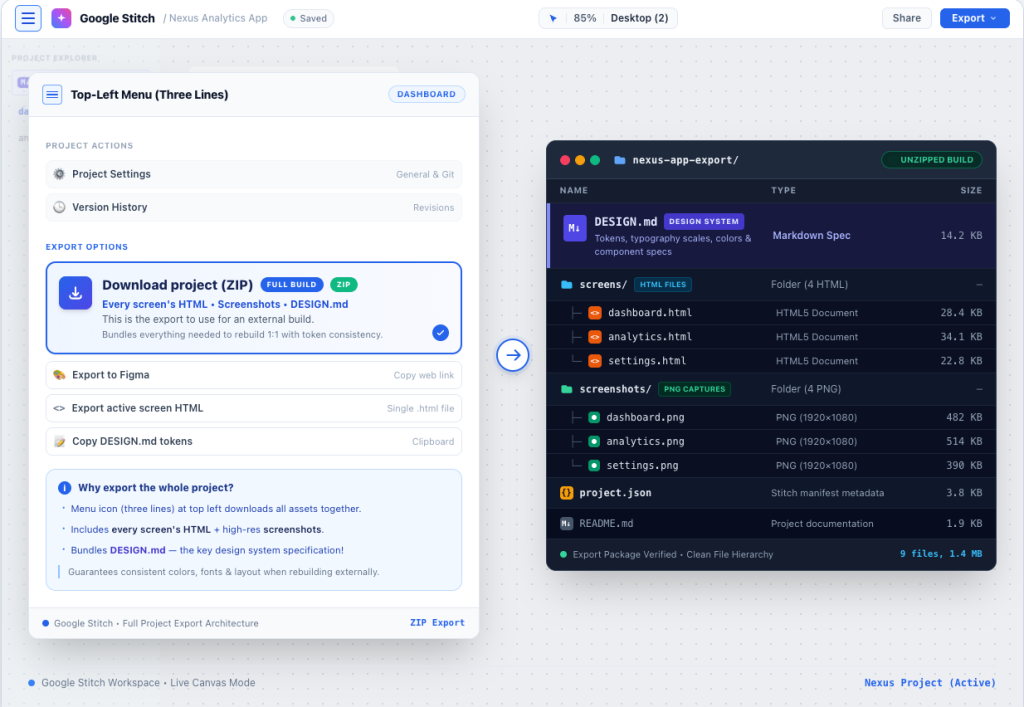
What DESIGN.md does for Claude Code
Most of the value is in this one file. Handed a pile of Tailwind HTML, an agent guesses which values are the system and which are accidents. Handed DESIGN.md, it has the answer written down: these are the six colors, this is the type scale, this is the spacing rhythm, buttons look like this. Ask Claude Code to treat DESIGN.md as the source of truth and the HTML as the layout reference, and the result is consistent across pages in a way that pasting HTML never is. You can also carry DESIGN.md into your next Stitch project so the brand does not get reinvented each time.
What Claude Code builds well from a Stitch export
- The structure: pages, sections, shared headers and footers, and navigation.
- Tokens: DESIGN.md to CSS Variables, Tailwind Config or a WordPress
theme.json. - Static pages that resemble the desktop screens on the first iteration.
- A production CSS build instead of the Tailwind CDN used in the export.
Where it stalls
- Forms. It will build the markup and, if asked, wire a form service; somebody still has to choose the service, set it up and test the inbox.
- Content management. A static site from Claude Code is edited by editing code. If you need a page editor, you are developing a theme for a CMS, not a web site.
- Hosting and the domain. Not part of the workflow; you deploy the result.
- Interactive elements. Elements such as carousels and tabs will need to be implemented by a developer.
- The last 10%. Pixel perfect design. The little details that can be the difference between a website that “looks like the screen” and a website that “matches the screen”.
Stitch to a WordPress block theme, with Claude Code
This is the route for a site a team will edit, and it is the one MightyMigrate uses. The most thorough public description of this process is by Stuart Duff in May 2026. In this description, Duff relies on a community skill (stitch-to-wp-theme-skill) to have Claude Code process a Stitch export, place DESIGN.md into a theme.json file, and generate a WordPress block theme (templates, patterns, style.css, functions.php). Duff then validated the block theme against a local WordPress Studio site through its MCP server.
- Export the Stitch project (connect the MCP server).
- In Claude Code, add the skill or describe the same job: use tokens from DESIGN.md in theme.json, build screens with core blocks in templates and patterns, and add header and footer template parts.
- Activate the theme on a local WordPress installation (WordPress Studio, Local, or staging site), and test it out.
- Fix what the validation finds. In that write-up:
wp:htmlplaceholders that should be real blocks, missing list classes, style attribute paths the editor rejects, a missing build step, and the carousel. - Add the content as pages, wire forms and analytics, host it.
His opinion is identical to ours, in that it is a “well-structured starting point, not a finished theme.” The heavy lifting (generating) takes only a few minutes. The rest (finishing) is where the site gets built.
When to hand it over
If you enjoy the loop and the site is yours to maintain, run it. If you want the site to exist by Thursday and be editable by people who have never opened a terminal, hand the export to someone who does this weekly. MightyMigrate’s rebuilds start from exactly this workflow and end with a developer finishing the theme, the content in pages, forms that send, analytics and consent, and a staging link.
Or have it done
Put the exported HTML on any temporary URL and scan it. $499 for a site of up to 15 pages, live in 48 hours, pixel for pixel to your Stitch screens, with a staging link before anything goes live.
Questions people ask
Do I need Claude Code to use Google Stitch?
No. Stitch exports HTML and pastes into Figma on its own. For turning the design into an actual website, you can use the Claude Code (or Cursor, or Gemini CLI).
Is the Stitch MCP server free?
This is part of Stitch, a free service from Google Labs. Claude Code itself needs a Claude plan or API access.
Can Claude Code make a WordPress theme from Stitch?
Yes, it looks good for a first attempt, especially with DESIGN.md as a reference. Plan for a developer to finish it before it goes near a client.
Stitch with Gemini CLI or Cursor instead?
Similar idea; the MCP server is agent-agnostic and the exported folder is just files. The differences are the agents’ own.
Checked on 28 September 2026 against Google’s Stitch community answers on exporting and Stuart Duff’s block-theme write-up (14 May 2026). The MightyMigrate observations are from our own rebuilds.