Step 1: export the design
Download the design in standalone HTML (and the assets zip) from the design’s export menu. If a developer or Claude Code is going to do the build, handoff the design to Claude Code. The bundle carries the design’s intent and code. Details of every export are in how to export a Claude Design.
Open the HTML in a browser and take screenshots of every page at desktop and phone width. You will use these as references to compare to once the site is completed.
Step 2: collect the content
Claude Design pages tend to ship with the copy you prompted and placeholder images. Now is when the real text, the real photos at full size, the logo files and the legal pages get gathered. What usually goes wrong: the site is built around placeholder copy and the real paragraphs are twice as long. Get the words first.
Step 3: set up WordPress and hosting
A fast managed host with WordPress installed on a temporary address with HTTPS and PHP 8.2 or later. Start from an empty block theme, not a general-purpose one. The design you will be replicating with this theme is very specific.
Or skip to the end
Everything from here on is what MightyMigrate does for $499: the theme, the pages, the forms, analytics and consent, and a staging link to approve. Put the exported HTML on any temporary URL and scan it for the fixed price.
Step 4: rebuild the design as a block theme
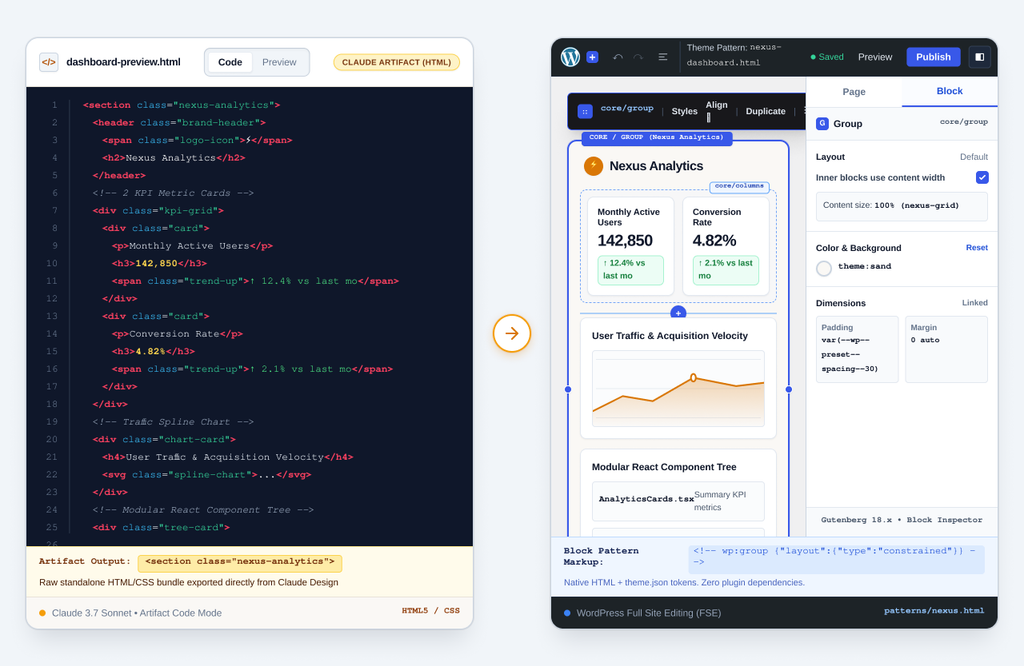
The exported HTML is unusually good as a specification: the CSS has the exact colors, type scale and spacing, and the markup shows every section. The mapping to WordPress is the same as for any HTML site (the general version is in HTML to WordPress):
- Colors, fonts, sizes and spacing from the CSS go into
theme.json. - Header and footer become template parts, with a navigation block reading a WordPress menu.
- Each section (hero, features, testimonials, pricing, CTA) becomes a pattern made of core blocks, matched to the screenshot.
- Interactive pieces (tabs, accordions) are derived from core blocks (where they exist) and a custom block (where they don’t).
With Claude Code: point it at the handoff bundle and ask for a WordPress block theme that reproduces the design, with tokens in theme.json and sections as patterns. This is how MightyMigrate starts its own rebuilds. Expect a well-structured first pass that needs a developer to finish: spacing that drifts from the screenshot, list and style attributes the editor rejects, and anything interactive. Budget the finishing, not just the generating.
Step 5: make the pages
Create a dedicated WordPress page for each page in the design, and use the patterns to create them. Using the content from step two, create the pages with the real content. Give the pages the slugs that the site should keep. Set up any posts or case studies if the site should have them, and create the first case study or post. Adding the second case study or post is when the team members that will be doing the site maintenance learn that the site is theirs.
Step 6: forms, analytics, consent
Every form in the design becomes a form plugin form that emails you, keeps the entry and posts to Slack or your CRM. Install the tag manager once, with consent defaults for your region, and add the privacy and terms pages. Submit every form and watch the inbox.
Step 7: domain and launch
In most cases, Claude Designs are not published on the domain. Once the hosting and SSL certificates are granted, point the DNS and set the URL. If the design was published for some time, (for example, a Vercel or Netlify domain send), list its URLs and redirect any that changed.
Step 8: check it against the design and against Google
- Side by side with the step-one screenshots, desktop and phone.
- Google PageSpeed Insights on the homepage: a lean block theme should score in the 90s on desktop. Two of the main reasons for the discrepancy are fonts and/or images, and the prototype’s assets are most likely to be the cause.
- Search Console: property added, sitemap submitted, one page inspected.
- Every form, from a phone.
Or have it done
MightyMigrate does steps three to eight for $499: a pixel-for-pixel block theme from your export, the content in editable pages, forms that email and post to Slack, analytics and consent, and a staging link before launch. Live in 48 hours. Managed hosting is optional and carries a 93+ desktop Performance guarantee.
Questions people ask
Can I paste the Claude Design HTML into WordPress?
Yes, you can add it to a Custom HTML block. However, it is important to note that the element will not be editable as blocks, its form will not be submittable, and the subsequent page will not have its header. It is a demo inside WordPress, not a WordPress site.
Will the WordPress version look exactly like the design?
If whoever builds it measures against the screenshots, yes. MightyMigrate’s guarantee is that it matches or the rebuild price comes back.
How long does it take?
With a developer: several days for a typical site, most of them in step four. With MightyMigrate: 48 hours to a staging link for up to 15 pages.
Claude Design facts checked on 28 September 2026 against Anthropic’s help article. The WordPress steps are how MightyMigrate does its own rebuilds.