What you get before you click anything
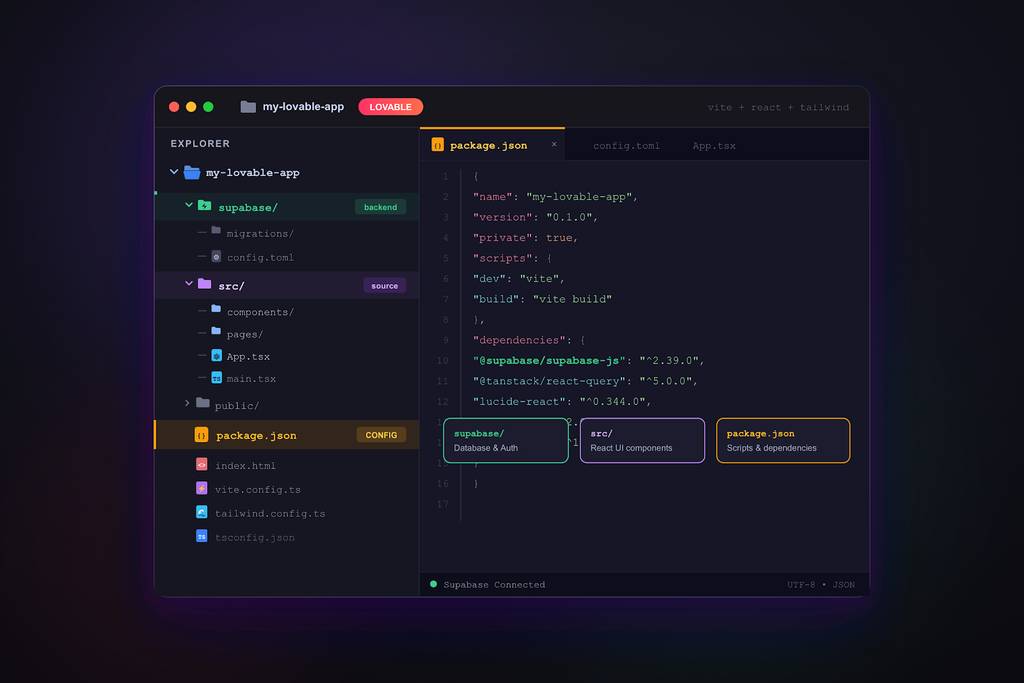
Lovable creates web applications and not web pages. Projects created on or after 13 May 2026 contain server-side rendering using TanStack Start. All other projects are React with Vite. Both use TypeScript, with styling by Tailwind. If the project contains a backend (Lovable Cloud or Supabase), the export will include edge functions and migrations. The export will not include any data stored in the database, application secrets, or hosting and/or a domain.
The folder you download contains the recipes for the website. The kitchen is provided by Lovable. This information is relevant for the last part of this page.
Method 1: connect GitHub (works on every plan)
This is Lovable’s recommended flow and the only one available on the free plan. It creates a repository in GitHub and syncs it to your Lovable project. Anything edited in Lovable is pushed to the synced repository, and anything edited in the synced repository appears in Lovable.
- Click the GitHub icon in the top bar in your project. Alternatively, you can go to Project settings > Integrations.
- Give Authorize Lovable access to your GitHub account or organization. You can limit it to a single new repository.
- Select “Create repository”. Lovable names the repository after the project and pushes the entire code to the
mainbranch. - after a small edit in Lovable you should see a new commit appear in the repository within a minute.
- You can get a copy of the repository on GitHub by clicking Code, then Download ZIP. You also have the option to clone the repository. To do this, use
git clonein your terminal.
Disconnecting a project from Lovable does not remove it. The project and code remain in Lovable, and changes made after disconnecting stay in Lovable only. Unfortunately, Lovable is not able to do the reverse. It will not create a project from the code in a repository that you wish to base it on.
Method 2: Download codebase (paid plans)
Something unique to paid plans is that you can bypass GitHub and do a project download directly. To do this, go to Project settings → Git, then click the Download codebase button. You can also use the download button in the code editor. Both methods will create a ZIP file with the latest project files. The project files are not synced and you will have to download them again to get the latest versions.
If the button is not visible, your plan does not contain it. GitHub sync is free.

Can you download a Lovable website on the free plan?
Yes. With GitHub. Direct download and custom domains are paid-plan features. If you’re building a site on Lovable, you can have the code for the site on any plan, including the free plan. Free-plan sites carry the “Edit with Lovable” badge. If your goal is to own the site rather than keep building in Lovable, you do not need to upgrade to get the code out.
What breaks the moment you host it somewhere else
People upload the ZIP to Netlify or Vercel and discover that what used to be a functional prototype has suddenly become a broken site. This is by design and the reason why users are encouraged to test their sites before relying on a self-hosted version. The following are reasons to check:
- Data, forms, and logins. Any code that interacted with the backend hosted on Lovable Cloud or Supabase, still exists and probably points to that backend. Rebuilding or moving that backend means changing all the forms and logins that code touched.
- Secrets and API keys are not in the export; they live in Lovable’s secret store or Supabase. AI features and third-party integrations stop working until you recreate them.
- Search engine rendering. Lovable’s hosting takes care of it: They pre-render older Vite projects and server-side render newer projects with TanStack. A Vite project on a different static host would be client-rendered again. Google would see no content and would need to execute JavaScript to display the page.
- The address. The
lovable.appURL is owned by Lovable. A custom domain you pointed to Lovable will need to be re-pointed. - Editing: Whoever works on the site next needs either Lovable (with credits) or a developer who knows React. There is no page editor in the folder.
Three ways forward
| Stay on Lovable | Host the code yourself | Rebuild it as WordPress | |
|---|---|---|---|
| Who edits it | You, by prompting, with credits | A developer, in React | Anyone on your team, in a page editor |
| Hosting | Lovable’s, with a paid plan for your domain | Vercel, Netlify or similar; you run it | Included with the rebuild, or your own |
| Forms and data | Lovable Cloud or Supabase | Rebuild the backend or keep paying for it | Forms that email you, store entries and post to Slack |
| Search engines | Handled on Lovable’s hosting | Your job (SSR or a prerender service) | Server-rendered pages, sitemap, per-page titles |
| Best for | An app you keep iterating | A team with developers | A marketing or business site that has to last |
| Cost | From $25 a month plus credits | Hosting plus developer time | $499 once, then optional hosting from $69 a month |
How do you proceed next? If your project is an app with users and data, you have the next two choices. If your project is a web site (a company site, a landing page, a portfolio site, a product site, etc.) then the third choice is where people end up, because a prototype is normally done to work out the design of a site, and a design is what gets rebuilt.
Or have it done
In just 48 hours, MightyMigrate rebuilds your site built on Lovable, pixel for pixel, as a new, faster, fully-hosted and fully-editable WordPress site. Additionally, forms, analytics, and everything else your site needs to function will be configured on the new site, and your Lovable site stays up until you approve the new one. The rebuild is $499 for a site. The scan is free: it reads your published Lovable URL and gives you a fixed price in under 60 seconds.
Questions people ask
Does downloading the code remove the project from Lovable?
No. GitHub sync and downloading both copy the code out. The project stays in Lovable until you delete it.
Can I upload the code back into Lovable later?
Not as a new project. According to Lovable’s own documentation, starting a project from pre-existing code is not an available option. The GitHub integration allows you to reflect your changes back to the synced project, so commits will flow to the synced project.
Does the export include my database?
It includes the migrations that describe the database and the edge functions that use it, but not the table/row data. For Supabase/Lovable Cloud, you will have to export the data separately.
Is “Lovable to HTML” a thing?
It’ll only render to HTML in the browser like any other web app, and there’s no “export as HTML pages” button; the project is a JavaScript application. If you want plain pages you can host anywhere and edit without prompting, that is a rebuild, not an export.
Where do I find the download in the editor?
View the code. On the paid plans, you’ll find the download control at the end of the file explorer. You’ll also find the download in Project settings > Git.
Checked on 28 September 2026 against Lovable’s documentation: Git sync overview, FAQ and SEO and AI search. Lovable changes quickly; if a button has moved, tell us and we will update this page.